Power-Z KM003C Portable USB-C Fast Charging Tester PD3.1 QC5.0 Digital Voltmeter & Ammeter Power Bank Tester
Power-Z KM003C Portable USB-C Fast Charging Tester PD3.1 QC5.0 Digital Voltmeter & Ammeter Power Bank Tester
Low stock
-
All orders are dispatched the next 3 business days!
-
We will beat any price. We back all products with a 1 year guarantee.
Order in the next 0 hours 0 minutes to get it by /09/2026
Couldn't load pickup availability
Guaranteed Safe Checkout
NEW ChargerLAB POWER-Z USB PD3.1 protocol 48V tester Type-C KM003C
"Quick Start"
1. Insert the Type-C port of the Power-Z into the charging port of the mobile phone
2. Insert the original charger into the C port at the bottom of the Power-Z
3. Turn on the power to start using, easily monitor charging voltage, current, power and other data
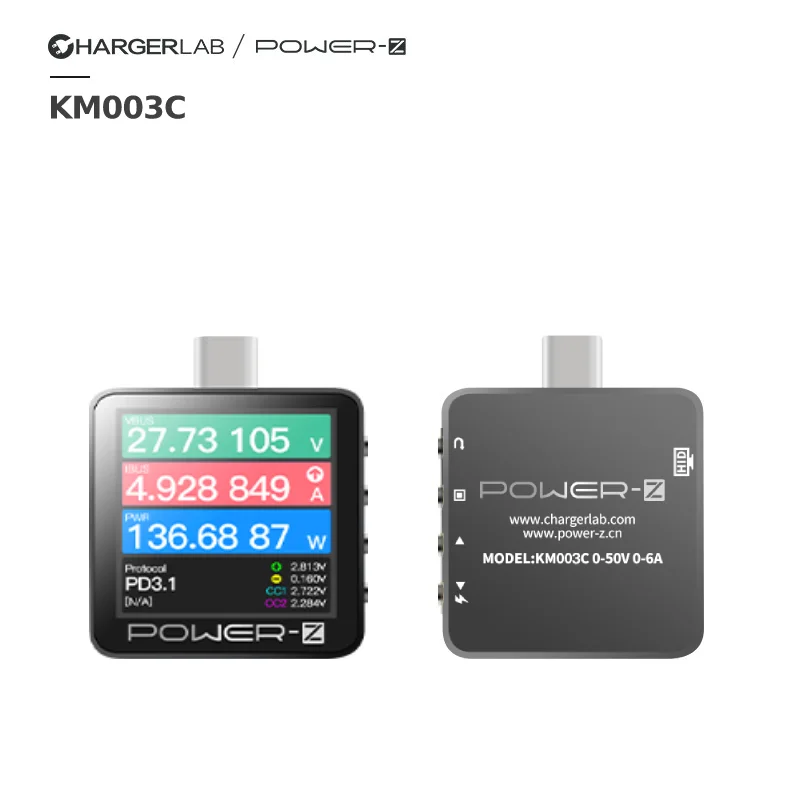
"Key Description" (top to bottom)
Button
1: Return, the main interface adjusts the text display direction
Button
2: OK, the main interface adjusts the data refresh frequency
Button
3: Previous page, the cursor moves up
Button
4: next page, cursor down
"Precautions"
1. The QR code manual will appear when you turn it on for the first time, you can choose to skip it and go directly to "Start Using"
2. The current firmware version is a test firmware, there are some small bugs that do not affect the use, please forgive me. Some unfinished functions and problems will be added and fixed in subsequent updates.
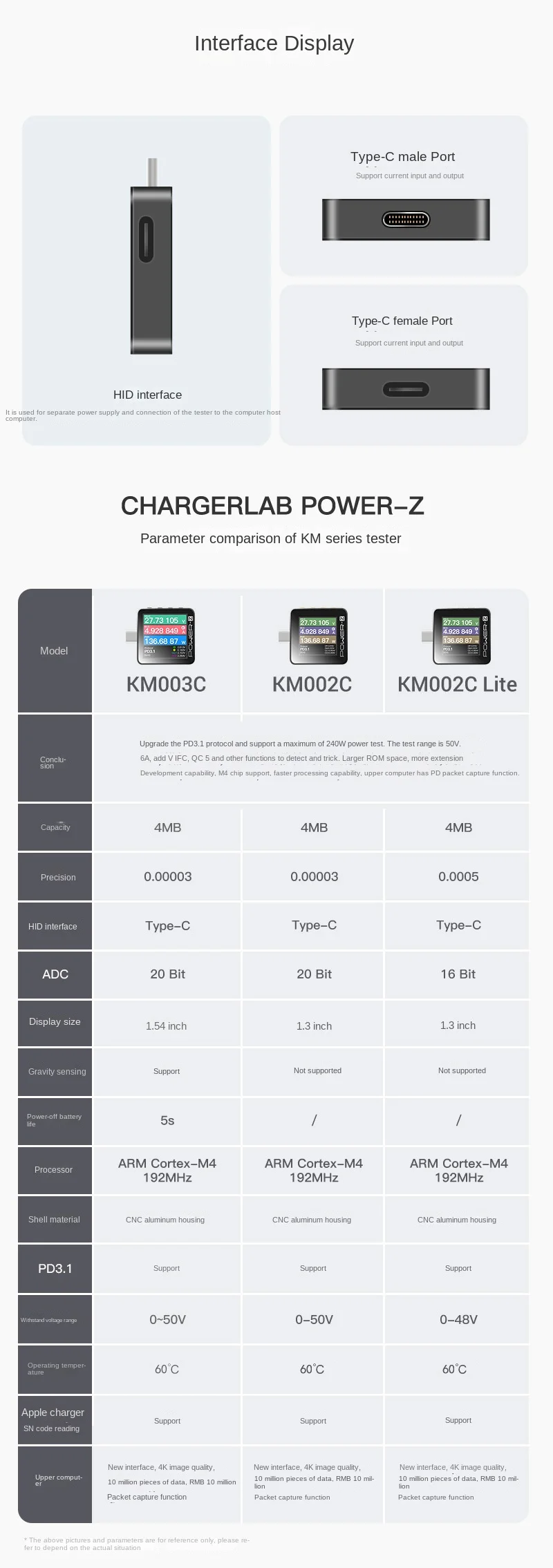
3. HID is a data interface, which is used to connect the host computer and PC suite (for Windows only), and can be powered by 5V during testing, which is more stable.
4. The official version of the manual will be updated synchronously with the official firmware


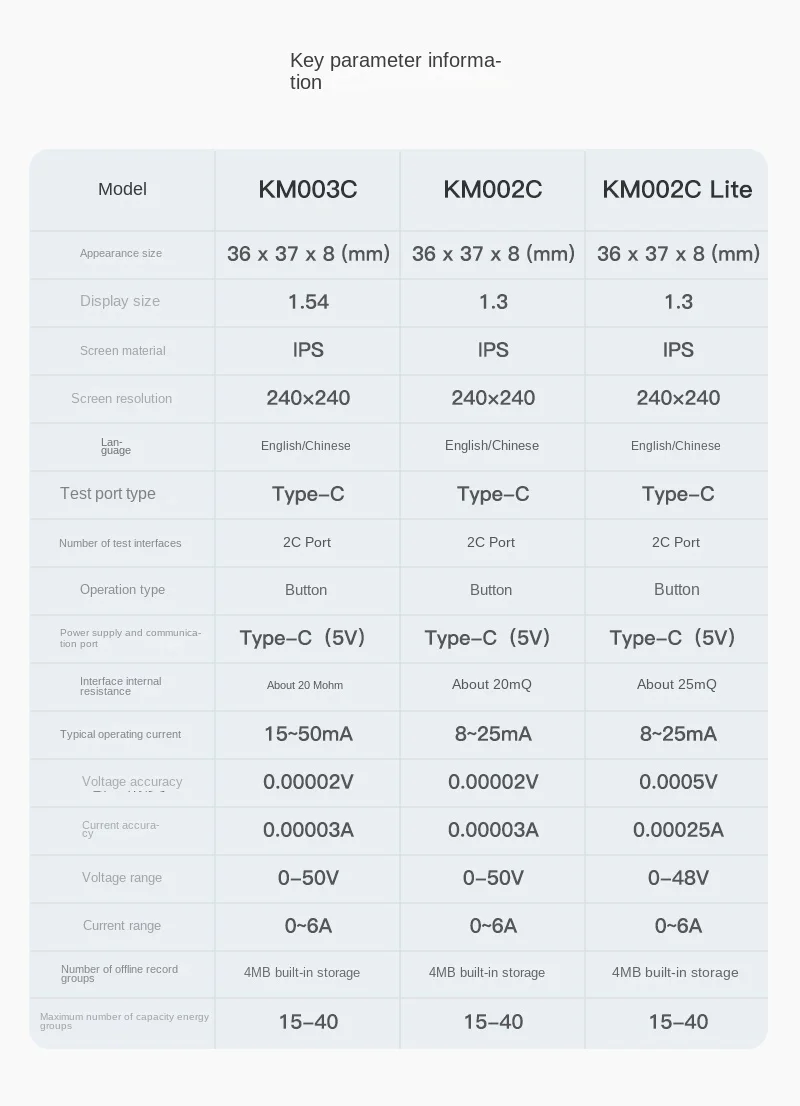
As the upgraded version of USB PD3.0 protocol, the new USB PD3.1 protocol can support up to 48V, And the charging power can reach 240W. According to the documents from USB-IF, the USB PD3.1 can support extended power range (EPR) of 28V, 36V, 48V and three sets of adjustable voltage supply (AVS).

Description
Description
NEW ChargerLAB POWER-Z USB PD3.1 protocol 48V tester Type-C KM003C
"Quick Start"
1. Insert the Type-C port of the Power-Z into the charging port of the mobile phone
2. Insert the original charger into the C port at the bottom of the Power-Z
3. Turn on the power to start using, easily monitor charging voltage, current, power and other data
"Key Description" (top to bottom)
Button
1: Return, the main interface adjusts the text display direction
Button
2: OK, the main interface adjusts the data refresh frequency
Button
3: Previous page, the cursor moves up
Button
4: next page, cursor down
"Precautions"
1. The QR code manual will appear when you turn it on for the first time, you can choose to skip it and go directly to "Start Using"
2. The current firmware version is a test firmware, there are some small bugs that do not affect the use, please forgive me. Some unfinished functions and problems will be added and fixed in subsequent updates.
3. HID is a data interface, which is used to connect the host computer and PC suite (for Windows only), and can be powered by 5V during testing, which is more stable.
4. The official version of the manual will be updated synchronously with the official firmware
As the upgraded version of USB PD3.0 protocol, the new USB PD3.1 protocol can support up to 48V, And the charging power can reach 240W. According to the documents from USB-IF, the USB PD3.1 can support extended power range (EPR) of 28V, 36V, 48V and three sets of adjustable voltage supply (AVS).
Item Specifics
Item Specifics
