HP363 Intelligent Digital RF Power Meter 1MHz to 10GHz -50 to 0dBm RF Signal Measuring Meter Module
HP363 Intelligent Digital RF Power Meter 1MHz to 10GHz -50 to 0dBm RF Signal Measuring Meter Module
In stock
-
All orders are dispatched the next 3 business days!
-
We will beat any price. We back all products with a 1 year guarantee.
Order in the next 0 hours 0 minutes to get it by /09/2026
Couldn't load pickup availability
Guaranteed Safe Checkout

ntelligent Digital RF Power Meter 1MHz to 10GHz -50 to 0dBm RF Signal Measuring Meter Module
Technical Parameters
|
Power measuring range |
-50~+0 dBm (adding RF attenuator can expand to 100dBm) |
|
Power measurement accuracy |
0.1dBm |
|
Frequency measuring range |
1MHz~10000 MHz |
|
Power measuring range |
1nW~1mW |
|
Operating power supply |
7-12VDC |
|
Operating current |
<50 mA |
|
Operating temperature |
-10℃~55℃ |
|
Storage temperature |
-20℃~70℃ |
|
Humidity |
85% R.H. non-condensation |
|
Size |
55x45x10 mm (LxWxH) |
Operating Instruction
● Unit: dBm
● Button functions:
[FUN]: function button; [MODE]: switching interface; [SEL]: Automatic adding or Subtracting button
1.1 Display data measured
Screen interface characters display
First row: " RF-POW -51.2 dBm "
Second row: " 610uV 7nW "
Explanation: -51.2dBm refers to signal dBm value; 610uV refers to input voltage value; 7nW refers to input power value.
1.2 Set RF power Attenuation value
Screen interface characters display:
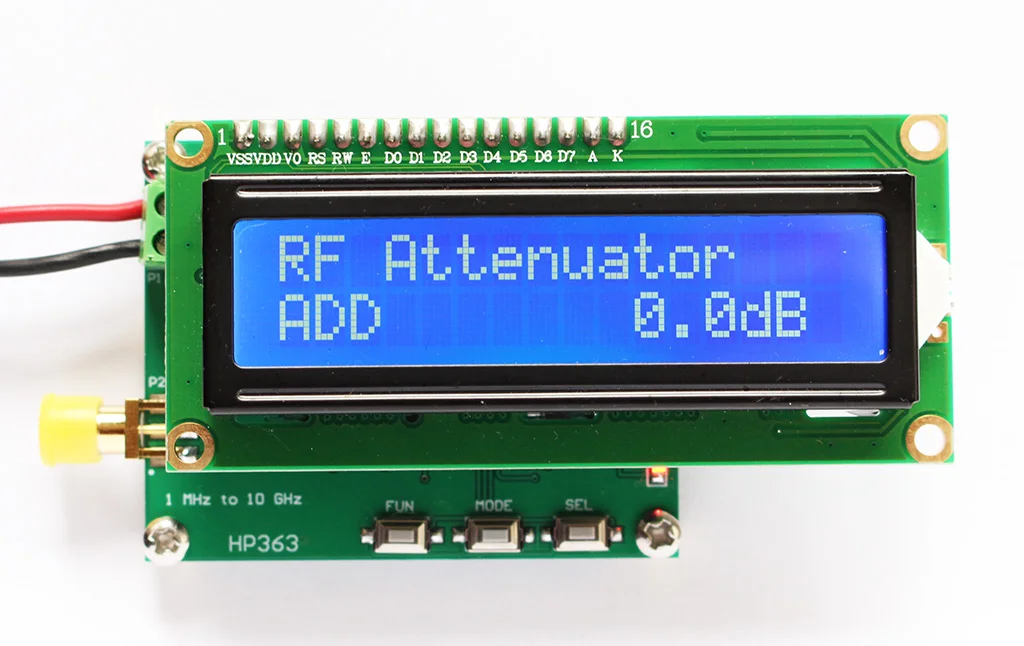
First row: "RF Attenuator "
Second row: "SUB 000dB "
Button operation:
[FUN]: Function button, select adding or subtracting option, if displays SUB, it refers to subtract value; if displays ADD, it refers to adding value. Long pressing FUN button can save the pre-setting dB value.
SEL: Auto-adding or Auto-subtracting button
* Adding different RF attenuator, user set related attenuation value, the RF power meter can read correct power parameters.
Terminals Definition
|
Pin Code |
Description |
|
P1 Terminal |
|
|
VDD |
Operating power supply 7-12V + |
|
GND |
Operating power supply - |
|
P2 Terminals |
|
|
RF |
RF signal input |
|
GND |
Power supply GND |
|
FX |
No function |
Note:
dB is a counting unit, if used it in power, dB = 10*lg(A/B). Using it in voltage or current, dB = 20*lg(A/B). dB is used to simply and briefly display a very large or small number (e.g.: a number has many 0, like 10000000.... or 0.00000001).
Examples:
X=1000000000000000 (15 x 0) can be displayed into 10lgX= 150dB
X=0.000000000000001 (15 x 0) can be displayed into 10lgX= -150dB
dBm is used to definite miliwatt, 0 dBm=1mW
dBw is used to definite watt, 0 dBW = 10lg1 W = 10lg1000 mw = 30 dBm
No matter in process controlling filed or signal processing filed, dB is usually used to definite power unit, count in 101g. While in some conditions, signal amplitude is used to describe power, in that conditions, it counts in 201g.
HP363 RF Power Meter package including:
1 Unit x Original HR363 RF Power Meter
1 Set x Professional User Manual






Description
Description
ntelligent Digital RF Power Meter 1MHz to 10GHz -50 to 0dBm RF Signal Measuring Meter Module
Technical Parameters
|
Power measuring range |
-50~+0 dBm (adding RF attenuator can expand to 100dBm) |
|
Power measurement accuracy |
0.1dBm |
|
Frequency measuring range |
1MHz~10000 MHz |
|
Power measuring range |
1nW~1mW |
|
Operating power supply |
7-12VDC |
|
Operating current |
<50 mA |
|
Operating temperature |
-10℃~55℃ |
|
Storage temperature |
-20℃~70℃ |
|
Humidity |
85% R.H. non-condensation |
|
Size |
55x45x10 mm (LxWxH) |
Operating Instruction
● Unit: dBm
● Button functions:
[FUN]: function button; [MODE]: switching interface; [SEL]: Automatic adding or Subtracting button
1.1 Display data measured
Screen interface characters display
First row: " RF-POW -51.2 dBm "
Second row: " 610uV 7nW "
Explanation: -51.2dBm refers to signal dBm value; 610uV refers to input voltage value; 7nW refers to input power value.
1.2 Set RF power Attenuation value
Screen interface characters display:
First row: "RF Attenuator "
Second row: "SUB 000dB "
Button operation:
[FUN]: Function button, select adding or subtracting option, if displays SUB, it refers to subtract value; if displays ADD, it refers to adding value. Long pressing FUN button can save the pre-setting dB value.
SEL: Auto-adding or Auto-subtracting button
* Adding different RF attenuator, user set related attenuation value, the RF power meter can read correct power parameters.
Terminals Definition
|
Pin Code |
Description |
|
P1 Terminal |
|
|
VDD |
Operating power supply 7-12V + |
|
GND |
Operating power supply - |
|
P2 Terminals |
|
|
RF |
RF signal input |
|
GND |
Power supply GND |
|
FX |
No function |
Note:
dB is a counting unit, if used it in power, dB = 10*lg(A/B). Using it in voltage or current, dB = 20*lg(A/B). dB is used to simply and briefly display a very large or small number (e.g.: a number has many 0, like 10000000.... or 0.00000001).
Examples:
X=1000000000000000 (15 x 0) can be displayed into 10lgX= 150dB
X=0.000000000000001 (15 x 0) can be displayed into 10lgX= -150dB
dBm is used to definite miliwatt, 0 dBm=1mW
dBw is used to definite watt, 0 dBW = 10lg1 W = 10lg1000 mw = 30 dBm
No matter in process controlling filed or signal processing filed, dB is usually used to definite power unit, count in 101g. While in some conditions, signal amplitude is used to describe power, in that conditions, it counts in 201g.
HP363 RF Power Meter package including:
1 Unit x Original HR363 RF Power Meter
1 Set x Professional User Manual
Item Specifics
Item Specifics
