HamGeek MAG662 TEF6686 DSP Full Band Radio FM/LW/MW/SW Radio Receiver with Screen Antenna Black
HamGeek MAG662 TEF6686 DSP Full Band Radio FM/LW/MW/SW Radio Receiver with Screen Antenna Black
In stock
-
All orders are dispatched the next 3 business days!
-
We will beat any price. We back all products with a 1 year guarantee.
Order in the next 0 hours 0 minutes to get it by /09/2026
Couldn't load pickup availability
Guaranteed Safe Checkout
HamGeek MAG662 TEF6686 DSP Full Band Radio FM/LW/MW/SW Radio Receiver with Screen Antenna Black
Description:
- Designed with automotive grade receiving chip TEF6686 for NXP, it has advanced anti-interference and excellent sound quality performance.
Specification:
- Product size: 107 x 58 x 29mm
- Speaker: cavity type, 8ohms, 3W
- Built-in battery: 4.2V 2300mAh
- Screen: 12864 resolution, 1.8-inch
- Charging voltage: DC 5V
- Antenna interface: SMA-K
- Net weight (excluding antenna): 149g
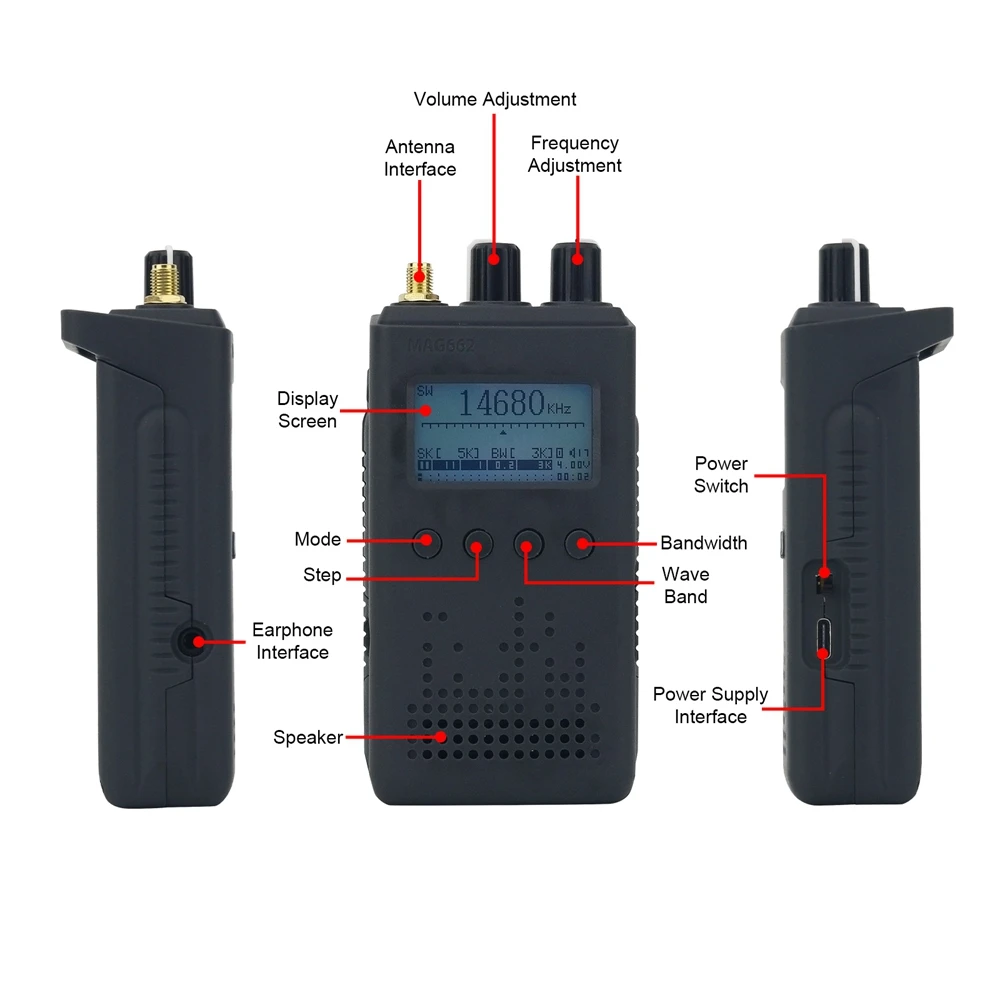
Interface Introduction:
- Antenna input: SMA connector, connect antenna to input signal
- Speaker: play the current radio station sound
- "Mode" button: to adjust manual tuning/automatic searching/Selected station saved mode
- "Step" button: to adjust frequency step interval
- "Wave band" button: to adjust radio receiving band FM/LW/MW/SW
- "Bandwidth" button: to adjust current frequency point bandwidth
- Earphone interface: 3.5mm earphone output (the speaker will keep mute when the earphone inserted)
- Power switch: to turn on/off the radio
- Volume adjustment: to adjust the current radio playing volume
- Frequency adjustment: to adjust the radio receiving frequency point
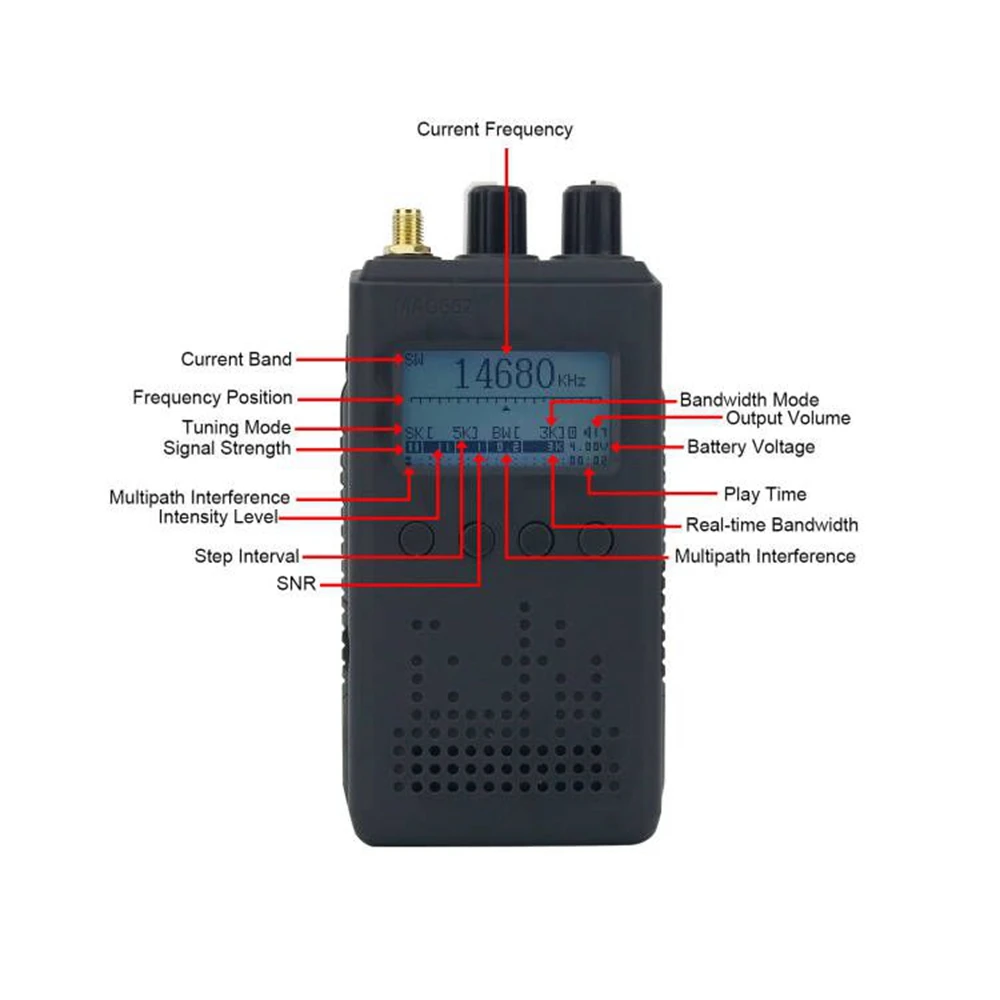
Save/Delete Radio Operation:
- Save: Long press the frequency knob, rotate the volume knob to set the stored station number, press the volume knob to save.
- Delete: Long press the frequency knob, rotate the volume knob to set the station number to be deleted, press the frequency knob and save it.
Package Included:
- 1 x Radio Receiver
- 1 x Antenna
Description
Description
HamGeek MAG662 TEF6686 DSP Full Band Radio FM/LW/MW/SW Radio Receiver with Screen Antenna Black
Description:
- Designed with automotive grade receiving chip TEF6686 for NXP, it has advanced anti-interference and excellent sound quality performance.
Specification:
- Product size: 107 x 58 x 29mm
- Speaker: cavity type, 8ohms, 3W
- Built-in battery: 4.2V 2300mAh
- Screen: 12864 resolution, 1.8-inch
- Charging voltage: DC 5V
- Antenna interface: SMA-K
- Net weight (excluding antenna): 149g
Interface Introduction:
- Antenna input: SMA connector, connect antenna to input signal
- Speaker: play the current radio station sound
- "Mode" button: to adjust manual tuning/automatic searching/Selected station saved mode
- "Step" button: to adjust frequency step interval
- "Wave band" button: to adjust radio receiving band FM/LW/MW/SW
- "Bandwidth" button: to adjust current frequency point bandwidth
- Earphone interface: 3.5mm earphone output (the speaker will keep mute when the earphone inserted)
- Power switch: to turn on/off the radio
- Volume adjustment: to adjust the current radio playing volume
- Frequency adjustment: to adjust the radio receiving frequency point
Save/Delete Radio Operation:
- Save: Long press the frequency knob, rotate the volume knob to set the stored station number, press the volume knob to save.
- Delete: Long press the frequency knob, rotate the volume knob to set the station number to be deleted, press the frequency knob and save it.
Package Included:
- 1 x Radio Receiver
- 1 x Antenna
Item Specifics
Item Specifics
