Autel MaxiTPMS TBE200 Laser Tire Tread Depth & Brake Disc Examiner Wear Tester Car Tire Tool Better Performance With ITS600
Autel MaxiTPMS TBE200 Laser Tire Tread Depth & Brake Disc Examiner Wear Tester Car Tire Tool Better Performance With ITS600
In stock
-
All orders are dispatched the next 3 business days!
-
We will beat any price. We back all products with a 1 year guarantee.
Order in the next 0 hours 0 minutes to get it by /12/2025
Couldn't load pickup availability
Guaranteed Safe Checkout
MaxiTPMS TBE200
The MaxiTPMS TBE200 is a laser-enabled tire tread depth & brake disc wear examiner that provides users with quick and accurate wear measurements.
Measure brake disc wear without having to remove tires. It features a 1.65" AMOLED super retina touchscreen, displaying measurement data curves in real-time.
TBE200 provides uneven wear analysis and detailed replacement & maintenance suggestions for quick tire service.
The TBE200 dual cameras enable users to document tire wear and damage and scan Tire Identification Number (TIN). Use the tool separately, or with ITS600 to view and print detailed TPMS reports.
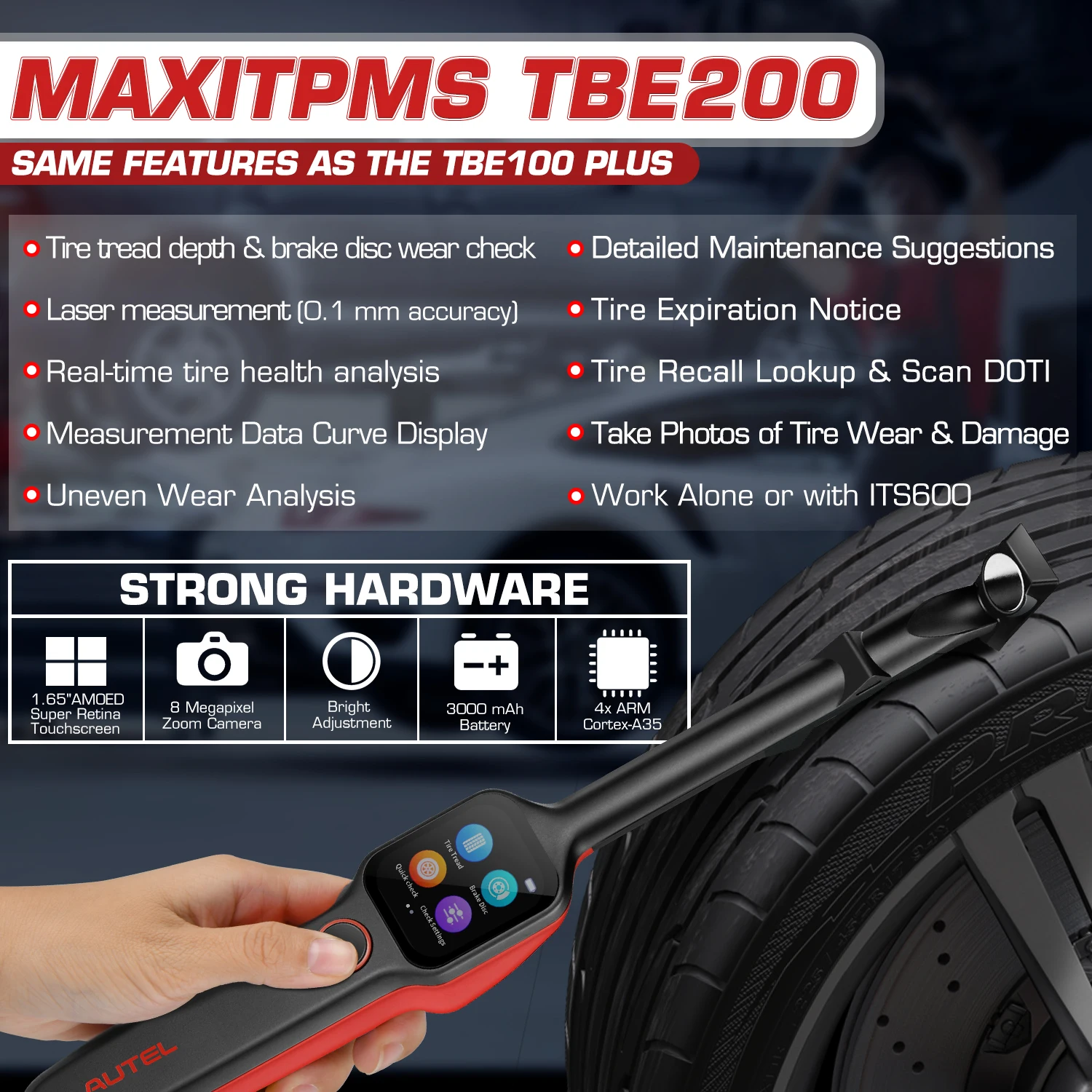
Tire Tread Check
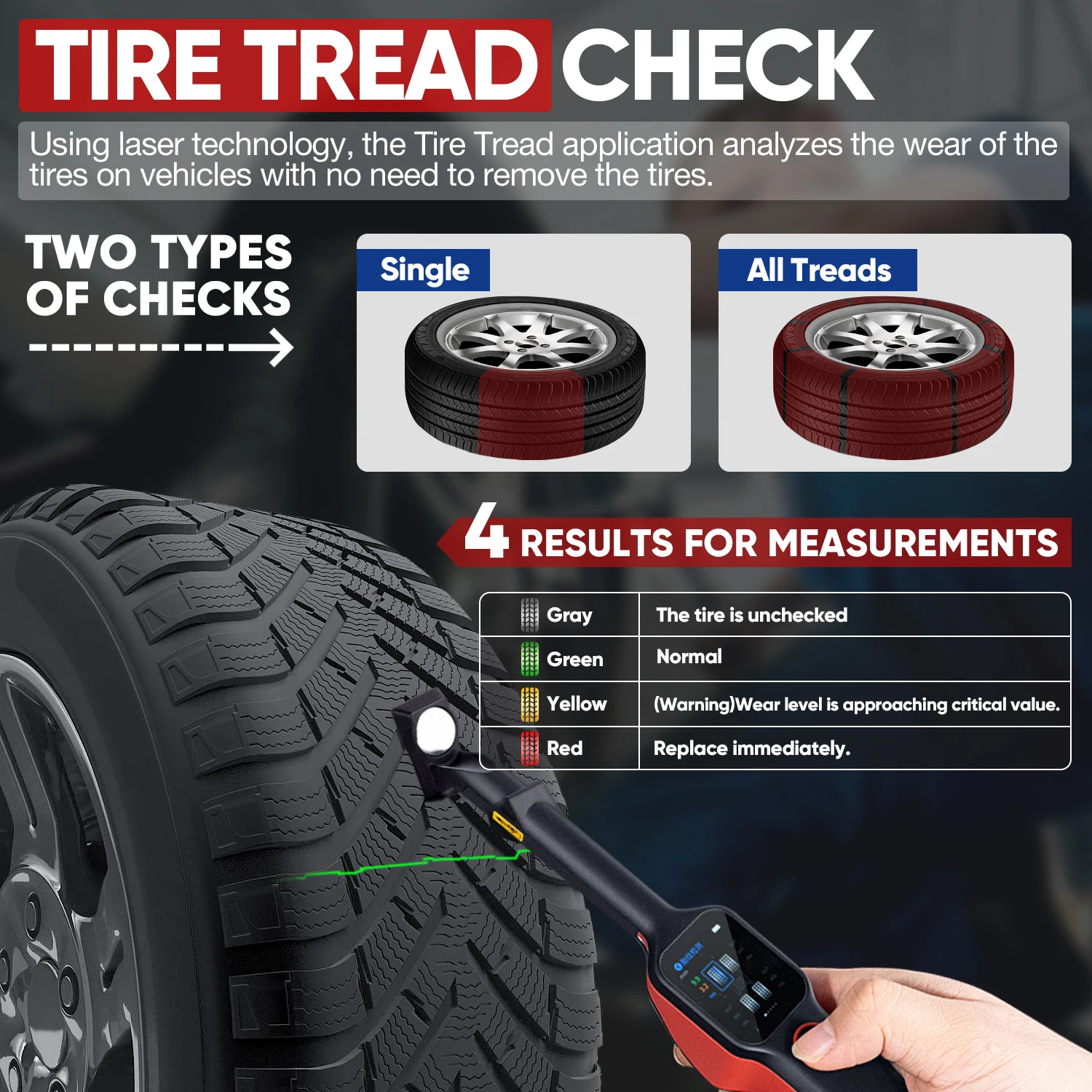
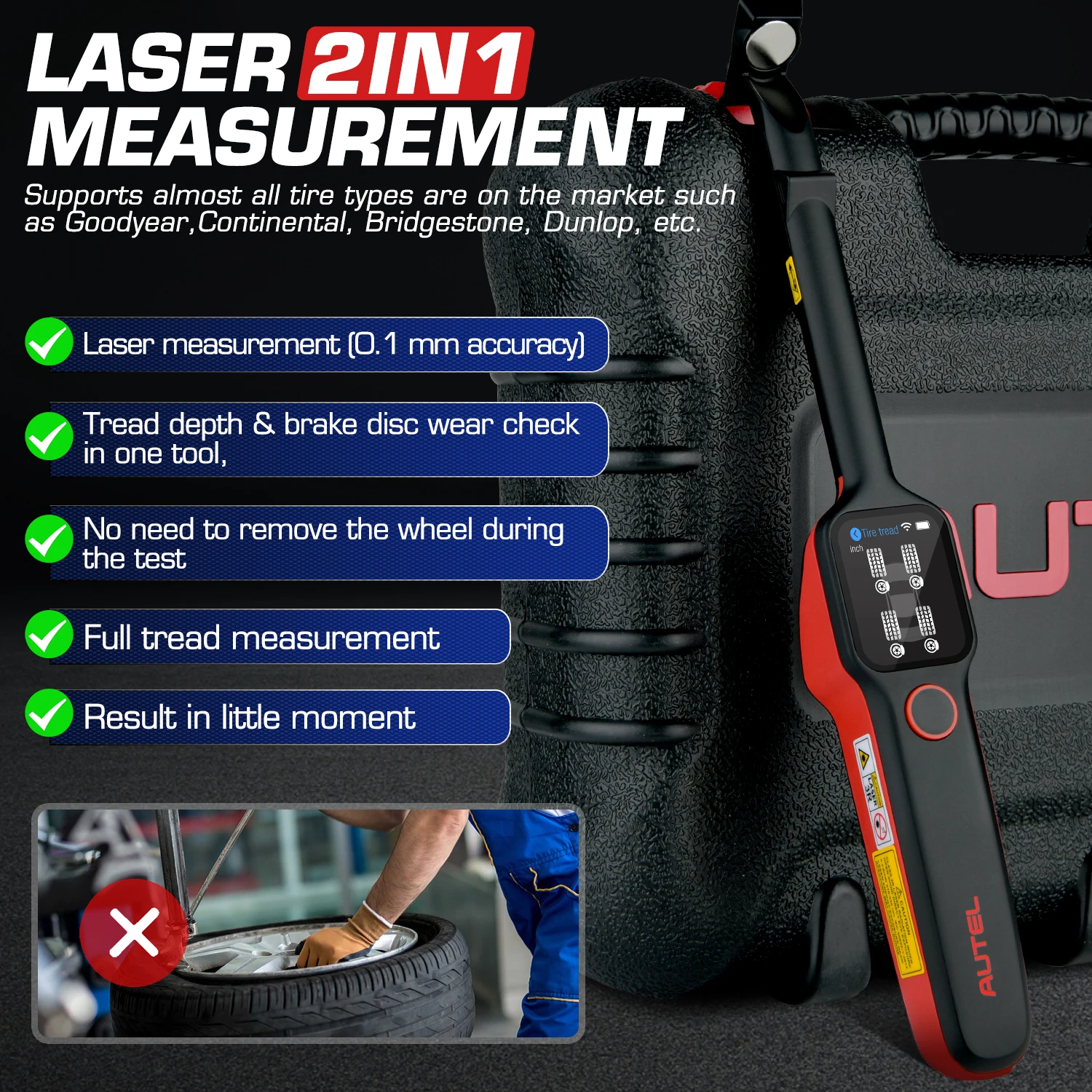
● Tire tread depth & brake disc wear check in one tool, no need to remove the wheel during measurement
● Laser measurement with 0.1mm accuracy
● Full tread measurement
● Quick Check both tread depth & brake disc
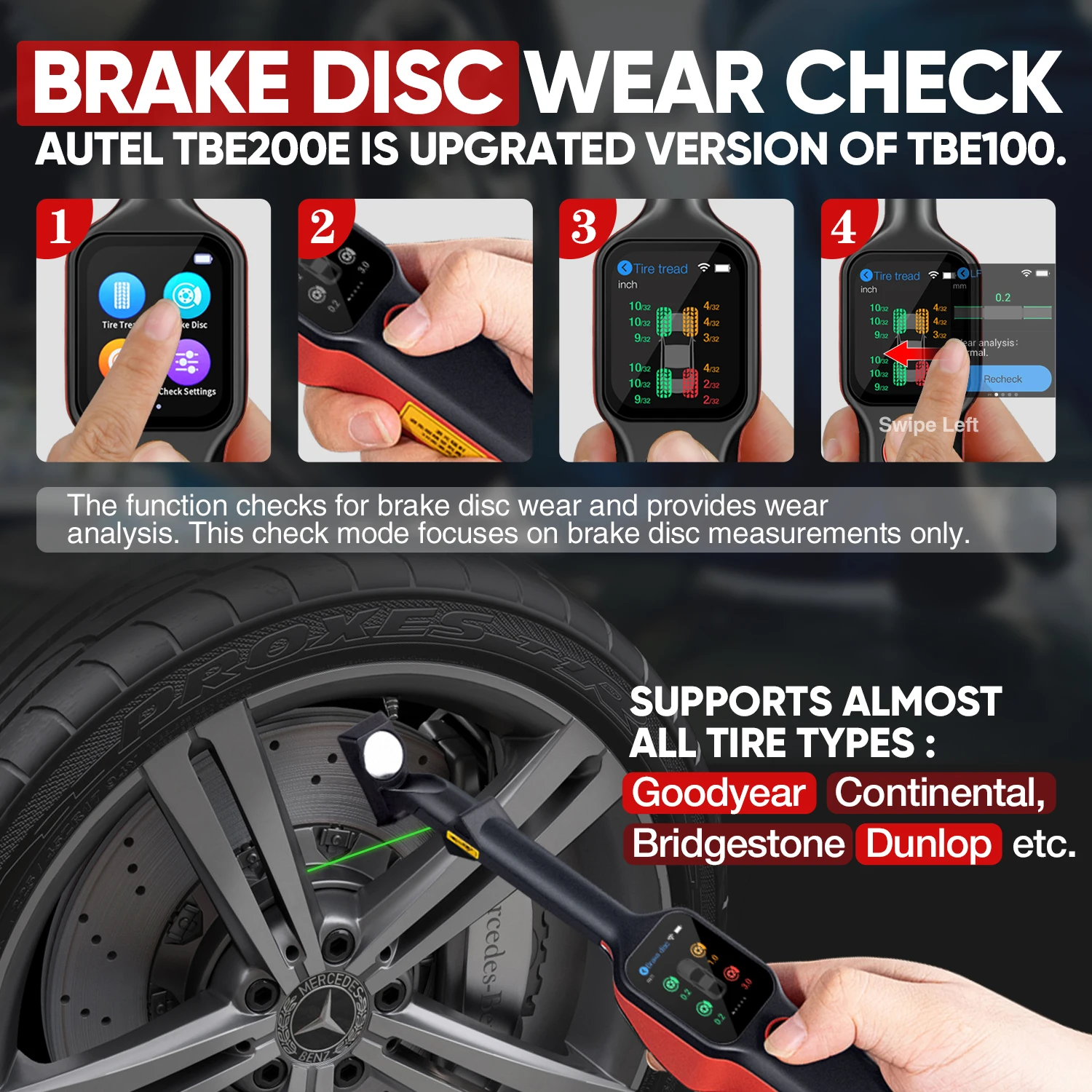
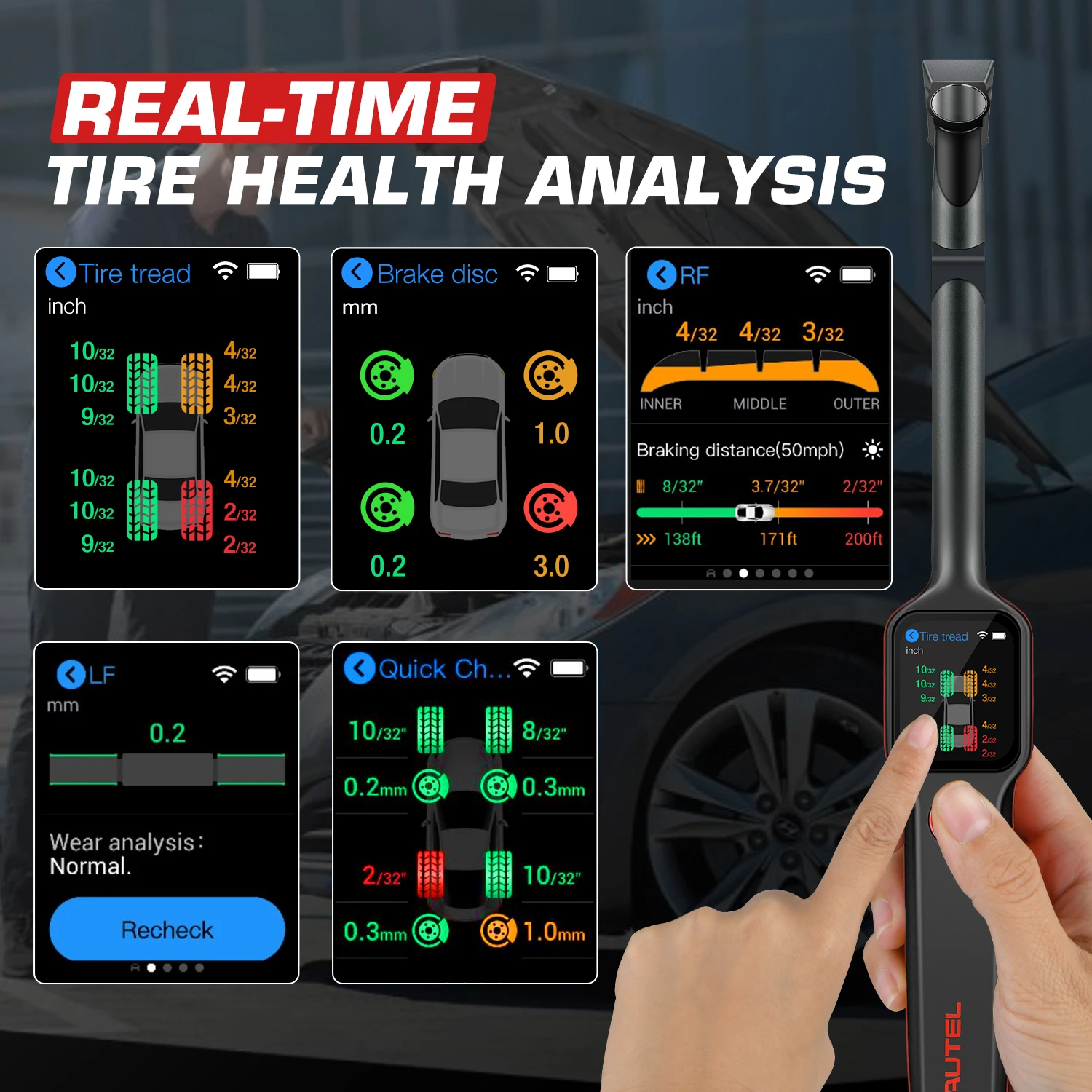
Real-Time Tire Health Analysis
● Real-time measurement data on touchscreen
● Measurement data curve display
● Uneven wear analysis
● Test detail for single tire tread / brake disc
● Detailed replacement & maintenance suggestions (tire/brake disc replacement, tire rotation/alignment servicing)
● Scan DOT, tire expiration notice, tire recall lookup
● Take photos of tire wear & damage
Vehicle Coverage
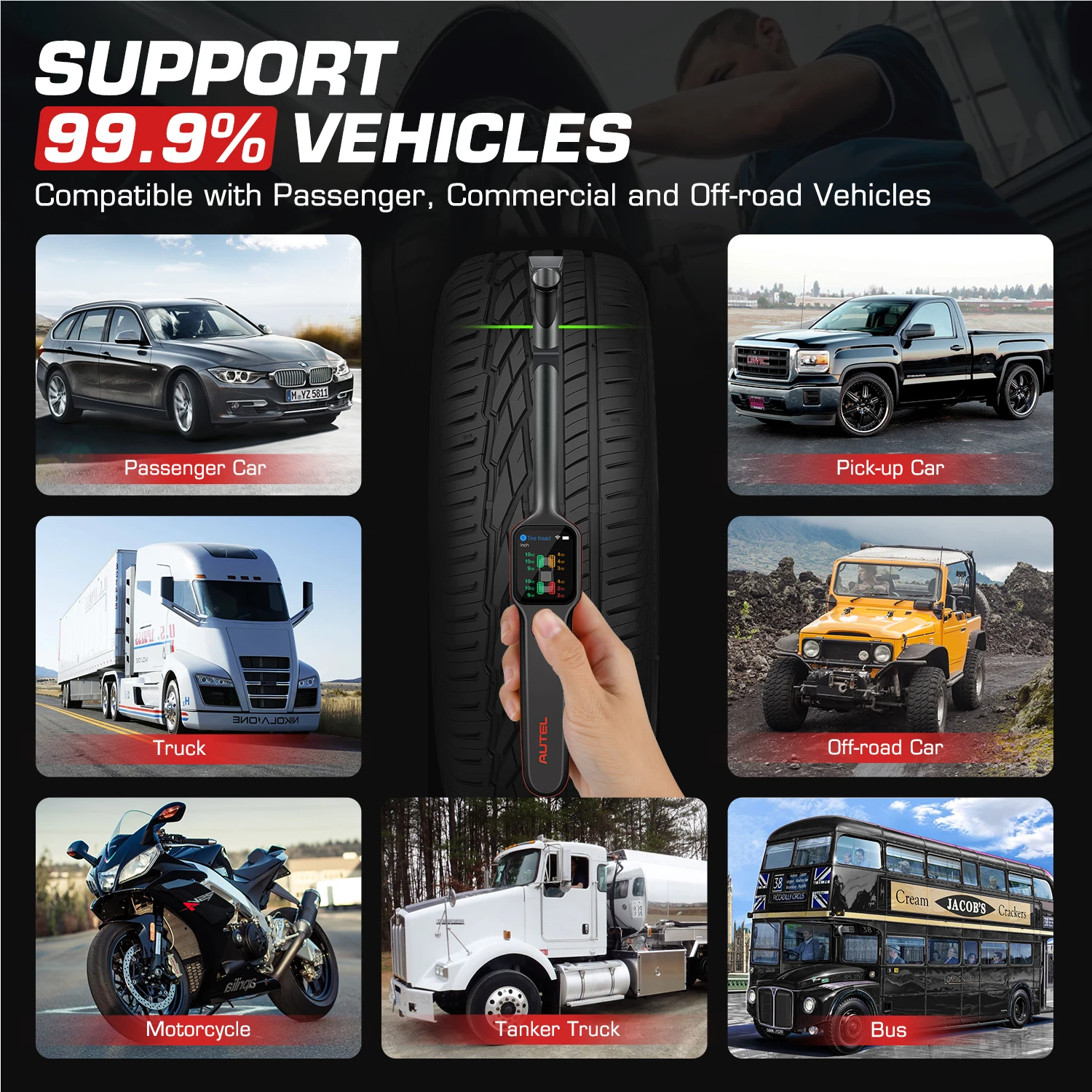
Autel TBE200 Supports 99% Vehicle to Ensure Your Safe Driving.
Autel TBE200 laser tpms tool is compatible with passenger cars, off-road vehicles and commercial vehicles.
Tire pressure wear standard is that when the tire is worn to the depth of the tread groove of only left 1.6 mm, it must be replaced. At this time, the "wear mark rubber strip running through the tread" will be clearly revealed, it means that the tires should be replaced immediately. Otherwise, the tires will slip when driving, which will prolong braking distance; in a more serious case, when the tire is driving on a slippery surface, prone to "floating and slipping" causing steering wheel and brake failure, It can lead to safety accidents, and it is also easy to cause puncture accidents.
Via dual camera, the technician can document tire wear and damage and scan the Tire Identification Number (TIN). The TIN is the string of six to 13 numbers or letters marked on the tire sidewall following the letters DOT (Department of Transportation) identifying the tire's week and year of manufacture.
Comprehensive Test Report
TPMS health, Tire tread depth & brake disc wear characteristics & Repair tips (Requires ITS600)


How to Use
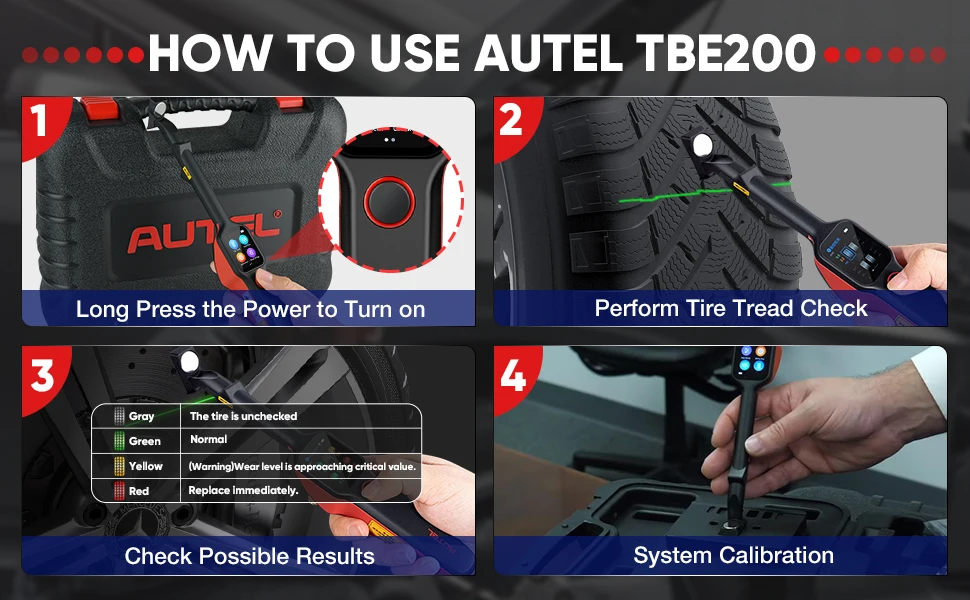
STEP 1: Long press the power button to turn on the tool.
STEP 2: Perform Tire Tread Check: On the Main Job screen, tap the Tread Check icon, and place the tool on the tire surface. Short press the power button. Ensure the laser line is perpendicular to the channels of the tire. The screen will display real-time measurement data, slide left to view details.
STEP 3: Possible Results for Measurements: Wear status is represented by icon color: A gray icon indicates the tire is untested; green indicates the tire is in good condition; yellow indicates a replacement is recommended; red indicates immediate replacement is recommended.
STEP4: Calibration: On the Main Job screen, tap the Calibration icon, and place the magnetic head on the calibration table. Press the power button to start. Wait for 1-2 minutes until calibration is complete.
Calibration frequency: Calibration is recommended every two months. Immediate calibration should be performed if deviations are detected or if the tool is dropped or in some manner mishandled.
Specification
Processor: 4x ARM Cortex-A35 (1.5 GHz)
Processor: Quad-core processor (1.5 GHz)
Memory: 16GB RAM LPDDR3 & 4GB ROM
Display: 1.65-inch AMOLED capacitive touchscreen with 348×442 resolution
Connectivity: Wi-Fi/ USB 2.0/ Type C
Camera: CMOS WXGA, 1 megapixel & 8 megapixel, 30fps
Audio Output: Output:Beep
Power and Battery: 3.7 V/3000 mAh 18650 lithium-ion battery / Charges via 5 V AC/DC power supply
Tested Battery Life: Around 8 hours of continuous use
Battery Charging Input: 5 V/1.5 A
Power Consumption: 300 mA (AMOLED on with default brightness) @3.7 V
Operating Temperature: -10 to 45°C(14 to 113°F)
Storage Temperature: -20 to 60°C (-4 to 140°F)
Dimensions (W x H x D): 283.0 mm (11.14”) x 39.0 mm (1.54”) x 33.5 mm (1.32”)
Comparison Chart


Packing List
1 x TBE200
1 x Calibration Table
1 x Power Adapter
1 x Type C USB Cable
1 x Quick Reference Guide
1 x Packing List
1 x Carrying Case
1 x Screen Wiper
Description
Description
MaxiTPMS TBE200
The MaxiTPMS TBE200 is a laser-enabled tire tread depth & brake disc wear examiner that provides users with quick and accurate wear measurements.
Measure brake disc wear without having to remove tires. It features a 1.65" AMOLED super retina touchscreen, displaying measurement data curves in real-time.
TBE200 provides uneven wear analysis and detailed replacement & maintenance suggestions for quick tire service.
The TBE200 dual cameras enable users to document tire wear and damage and scan Tire Identification Number (TIN). Use the tool separately, or with ITS600 to view and print detailed TPMS reports.
Tire Tread Check
● Tire tread depth & brake disc wear check in one tool, no need to remove the wheel during measurement
● Laser measurement with 0.1mm accuracy
● Full tread measurement
● Quick Check both tread depth & brake disc
Real-Time Tire Health Analysis
● Real-time measurement data on touchscreen
● Measurement data curve display
● Uneven wear analysis
● Test detail for single tire tread / brake disc
● Detailed replacement & maintenance suggestions (tire/brake disc replacement, tire rotation/alignment servicing)
● Scan DOT, tire expiration notice, tire recall lookup
● Take photos of tire wear & damage
Vehicle Coverage
Autel TBE200 Supports 99% Vehicle to Ensure Your Safe Driving.
Autel TBE200 laser tpms tool is compatible with passenger cars, off-road vehicles and commercial vehicles.
Tire pressure wear standard is that when the tire is worn to the depth of the tread groove of only left 1.6 mm, it must be replaced. At this time, the "wear mark rubber strip running through the tread" will be clearly revealed, it means that the tires should be replaced immediately. Otherwise, the tires will slip when driving, which will prolong braking distance; in a more serious case, when the tire is driving on a slippery surface, prone to "floating and slipping" causing steering wheel and brake failure, It can lead to safety accidents, and it is also easy to cause puncture accidents.
Via dual camera, the technician can document tire wear and damage and scan the Tire Identification Number (TIN). The TIN is the string of six to 13 numbers or letters marked on the tire sidewall following the letters DOT (Department of Transportation) identifying the tire's week and year of manufacture.
Comprehensive Test Report
TPMS health, Tire tread depth & brake disc wear characteristics & Repair tips (Requires ITS600)
How to Use
STEP 1: Long press the power button to turn on the tool.
STEP 2: Perform Tire Tread Check: On the Main Job screen, tap the Tread Check icon, and place the tool on the tire surface. Short press the power button. Ensure the laser line is perpendicular to the channels of the tire. The screen will display real-time measurement data, slide left to view details.
STEP 3: Possible Results for Measurements: Wear status is represented by icon color: A gray icon indicates the tire is untested; green indicates the tire is in good condition; yellow indicates a replacement is recommended; red indicates immediate replacement is recommended.
STEP4: Calibration: On the Main Job screen, tap the Calibration icon, and place the magnetic head on the calibration table. Press the power button to start. Wait for 1-2 minutes until calibration is complete.
Calibration frequency: Calibration is recommended every two months. Immediate calibration should be performed if deviations are detected or if the tool is dropped or in some manner mishandled.
Specification
Processor: 4x ARM Cortex-A35 (1.5 GHz)
Processor: Quad-core processor (1.5 GHz)
Memory: 16GB RAM LPDDR3 & 4GB ROM
Display: 1.65-inch AMOLED capacitive touchscreen with 348×442 resolution
Connectivity: Wi-Fi/ USB 2.0/ Type C
Camera: CMOS WXGA, 1 megapixel & 8 megapixel, 30fps
Audio Output: Output:Beep
Power and Battery: 3.7 V/3000 mAh 18650 lithium-ion battery / Charges via 5 V AC/DC power supply
Tested Battery Life: Around 8 hours of continuous use
Battery Charging Input: 5 V/1.5 A
Power Consumption: 300 mA (AMOLED on with default brightness) @3.7 V
Operating Temperature: -10 to 45°C(14 to 113°F)
Storage Temperature: -20 to 60°C (-4 to 140°F)
Dimensions (W x H x D): 283.0 mm (11.14”) x 39.0 mm (1.54”) x 33.5 mm (1.32”)
Comparison Chart
Packing List
1 x TBE200
1 x Calibration Table
1 x Power Adapter
1 x Type C USB Cable
1 x Quick Reference Guide
1 x Packing List
1 x Carrying Case
1 x Screen Wiper
Item Specifics
Item Specifics
Description
MaxiTPMS TBE200
The MaxiTPMS TBE200 is a laser-enabled tire tread depth & brake disc wear examiner that provides users with quick and accurate wear measurements.
Measure brake disc wear without having to remove tires. It features a 1.65" AMOLED super retina touchscreen, displaying measurement data curves in real-time.
TBE200 provides uneven wear analysis and detailed replacement & maintenance suggestions for quick tire service.
The TBE200 dual cameras enable users to document tire wear and damage and scan Tire Identification Number (TIN). Use the tool separately, or with ITS600 to view and print detailed TPMS reports.
Tire Tread Check
● Tire tread depth & brake disc wear check in one tool, no need to remove the wheel during measurement
● Laser measurement with 0.1mm accuracy
● Full tread measurement
● Quick Check both tread depth & brake disc
Real-Time Tire Health Analysis
● Real-time measurement data on touchscreen
● Measurement data curve display
● Uneven wear analysis
● Test detail for single tire tread / brake disc
● Detailed replacement & maintenance suggestions (tire/brake disc replacement, tire rotation/alignment servicing)
● Scan DOT, tire expiration notice, tire recall lookup
● Take photos of tire wear & damage
Vehicle Coverage
Autel TBE200 Supports 99% Vehicle to Ensure Your Safe Driving.
Autel TBE200 laser tpms tool is compatible with passenger cars, off-road vehicles and commercial vehicles.
Tire pressure wear standard is that when the tire is worn to the depth of the tread groove of only left 1.6 mm, it must be replaced. At this time, the "wear mark rubber strip running through the tread" will be clearly revealed, it means that the tires should be replaced immediately. Otherwise, the tires will slip when driving, which will prolong braking distance; in a more serious case, when the tire is driving on a slippery surface, prone to "floating and slipping" causing steering wheel and brake failure, It can lead to safety accidents, and it is also easy to cause puncture accidents.
Via dual camera, the technician can document tire wear and damage and scan the Tire Identification Number (TIN). The TIN is the string of six to 13 numbers or letters marked on the tire sidewall following the letters DOT (Department of Transportation) identifying the tire's week and year of manufacture.
Comprehensive Test Report
TPMS health, Tire tread depth & brake disc wear characteristics & Repair tips (Requires ITS600)
How to Use
STEP 1: Long press the power button to turn on the tool.
STEP 2: Perform Tire Tread Check: On the Main Job screen, tap the Tread Check icon, and place the tool on the tire surface. Short press the power button. Ensure the laser line is perpendicular to the channels of the tire. The screen will display real-time measurement data, slide left to view details.
STEP 3: Possible Results for Measurements: Wear status is represented by icon color: A gray icon indicates the tire is untested; green indicates the tire is in good condition; yellow indicates a replacement is recommended; red indicates immediate replacement is recommended.
STEP4: Calibration: On the Main Job screen, tap the Calibration icon, and place the magnetic head on the calibration table. Press the power button to start. Wait for 1-2 minutes until calibration is complete.
Calibration frequency: Calibration is recommended every two months. Immediate calibration should be performed if deviations are detected or if the tool is dropped or in some manner mishandled.
Specification
Processor: 4x ARM Cortex-A35 (1.5 GHz)
Processor: Quad-core processor (1.5 GHz)
Memory: 16GB RAM LPDDR3 & 4GB ROM
Display: 1.65-inch AMOLED capacitive touchscreen with 348×442 resolution
Connectivity: Wi-Fi/ USB 2.0/ Type C
Camera: CMOS WXGA, 1 megapixel & 8 megapixel, 30fps
Audio Output: Output:Beep
Power and Battery: 3.7 V/3000 mAh 18650 lithium-ion battery / Charges via 5 V AC/DC power supply
Tested Battery Life: Around 8 hours of continuous use
Battery Charging Input: 5 V/1.5 A
Power Consumption: 300 mA (AMOLED on with default brightness) @3.7 V
Operating Temperature: -10 to 45°C(14 to 113°F)
Storage Temperature: -20 to 60°C (-4 to 140°F)
Dimensions (W x H x D): 283.0 mm (11.14”) x 39.0 mm (1.54”) x 33.5 mm (1.32”)
Comparison Chart
Packing List
1 x TBE200
1 x Calibration Table
1 x Power Adapter
1 x Type C USB Cable
1 x Quick Reference Guide
1 x Packing List
1 x Carrying Case
1 x Screen Wiper
