Autel GBOX3 Key Programming Tool G-BOX For Mercedes-Benz BMW Toyota 4A All Key Lost Work Key Programmer With KM100/ IM508/ IM608
Autel GBOX3 Key Programming Tool G-BOX For Mercedes-Benz BMW Toyota 4A All Key Lost Work Key Programmer With KM100/ IM508/ IM608
In stock
-
All orders are dispatched the next 3 business days!
-
We will beat any price. We back all products with a 1 year guarantee.
Order in the next 0 hours 0 minutes to get it by /12/2025
Couldn't load pickup availability
Guaranteed Safe Checkout



About Autel G-BOX3:
1. G-Box 3 Work with IM608 / IM508 / KM100 / XP400PRO
2. For BMW DME/ DDE ISN Reading and Writing in Boot Mode for 20 Types
(EDC17, MEVD17, MSV90, MSD87, etc)
3. Faster Password Calculation for Mercedes-benz All Key Lost
(W172, W204, W207, W209, W211)
4. Mercedes-benz ECU Data and EIS Password Calculation
5. For Mercedes-benz DAS3 can EIS/ EZS All Keys Lost
6. No Need to Remove and Reinsert the Key for W221 & W164 after 2009 Model
7. No More Repeated Insertions and Removals of IR Simulator for 10 Types of EIS
8. Passport Reading for 9 Type EIS When All Keys Lost on vehicle
9. VAG ECM IMMO data reading & data synchronization for 18 types
(MQB EDC17, MED17, etc)
10. Engine ECU Reading/ Writing for BOSCH MD1/ MG1 (VAG, BMW, PSA, OPEL, etc)

GBOX3 vs GBOX2
GBOX3 adds the following additional functions on the basis of GBOX2:
● Supports on-vehicle and on-bench FastMode in an All Keys Lost scenario for Mercedes-Benz vehicles using the DAS3 EIS/EZS.
● Bosch engine ECU read and write on BMW F-chassis and Volkswagen MQB vehicles.
● Engine ECU reading/writing for BOSCH MD1/ MG1 (VAG, BMW, PSA, OPEL, etc)


Autel G-BOX3 Description:
● Faster password calculation for Mercedes-benz All Key Lost
● 8X times faster password calculation for W172, W204, W207
● 4X times faster password calculation for W209, W211
● No more repeated insertions and removals of IR simulator for 10 types of EIS
● Passport reading for 9 type EIS when all keys lost on vehicle
● BMW DME/ DDE ISN reading for 20 types (EDC17, MEVD17, MSV90, MSD87, etc)
● VAG ECM IMMO data reading & data synchronization for 18 types (MQB EDC17, MED17, etc)
● Engine ECU reading/writing for BOSCH MD1/ MG1(VAG, BMW, PSA, OPEL, etc)
How does Autel G-Box Work?
A. OBDII Operation When All Keys of Mercedes-Benz Vehicle Are Lost
(This method is suitable for Mercedes-Benz W204 , W207, W216 and W164 EISs after the year 2009)
1. Connect the G-Box to vehicles's OBDII
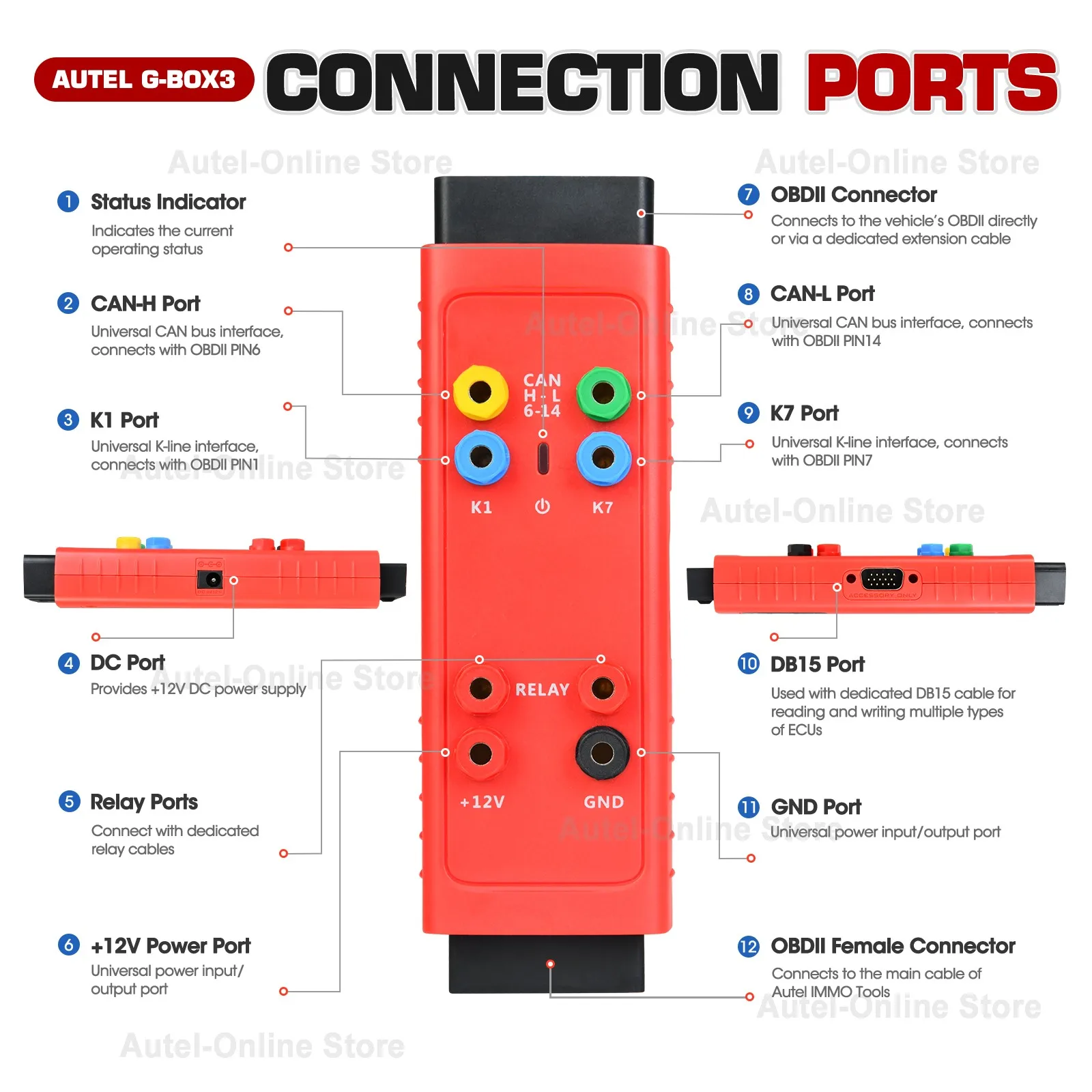
2. Remove the fuse of vehicle EIS, Connect the Relay ports to the fuse using the supplied fuse cable
3. When the vehicle has an ELV, connect the K7 port and ELV plug using the supplied K-line cable
4. Connect the G-Box to the Autel Diagnostic Tablet
B. Desktop Operation When All Keys of Mercedes-Benz Vehicle are Lost
(This Method is suitable for all Mercedes-Benz EISs that are already supported by Autel Diagnostic Tablet.)
1. Connect the G-Box to the Mercedes-Benz EIS using the supplied DB15 Cable
2. Connect to the DC port of G-Box using a power adapter (DV 12V)
3. Connect the G-Box to the Autel Diagnostic Tablet

Package Included:
1 x Autel G-BOX3
1 x DB15 Cable
1 x K-Line Cable
1 x Fuse Cable
2 x Fuse (5A)
2 x Clamp Cable
1 x OBDII Extension Cable
1 x Quick Reference Guide


Description
Description
About Autel G-BOX3:
1. G-Box 3 Work with IM608 / IM508 / KM100 / XP400PRO
2. For BMW DME/ DDE ISN Reading and Writing in Boot Mode for 20 Types
(EDC17, MEVD17, MSV90, MSD87, etc)
3. Faster Password Calculation for Mercedes-benz All Key Lost
(W172, W204, W207, W209, W211)
4. Mercedes-benz ECU Data and EIS Password Calculation
5. For Mercedes-benz DAS3 can EIS/ EZS All Keys Lost
6. No Need to Remove and Reinsert the Key for W221 & W164 after 2009 Model
7. No More Repeated Insertions and Removals of IR Simulator for 10 Types of EIS
8. Passport Reading for 9 Type EIS When All Keys Lost on vehicle
9. VAG ECM IMMO data reading & data synchronization for 18 types
(MQB EDC17, MED17, etc)
10. Engine ECU Reading/ Writing for BOSCH MD1/ MG1 (VAG, BMW, PSA, OPEL, etc)
GBOX3 vs GBOX2
GBOX3 adds the following additional functions on the basis of GBOX2:
● Supports on-vehicle and on-bench FastMode in an All Keys Lost scenario for Mercedes-Benz vehicles using the DAS3 EIS/EZS.
● Bosch engine ECU read and write on BMW F-chassis and Volkswagen MQB vehicles.
● Engine ECU reading/writing for BOSCH MD1/ MG1 (VAG, BMW, PSA, OPEL, etc)
Autel G-BOX3 Description:
● Faster password calculation for Mercedes-benz All Key Lost
● 8X times faster password calculation for W172, W204, W207
● 4X times faster password calculation for W209, W211
● No more repeated insertions and removals of IR simulator for 10 types of EIS
● Passport reading for 9 type EIS when all keys lost on vehicle
● BMW DME/ DDE ISN reading for 20 types (EDC17, MEVD17, MSV90, MSD87, etc)
● VAG ECM IMMO data reading & data synchronization for 18 types (MQB EDC17, MED17, etc)
● Engine ECU reading/writing for BOSCH MD1/ MG1(VAG, BMW, PSA, OPEL, etc)
How does Autel G-Box Work?
A. OBDII Operation When All Keys of Mercedes-Benz Vehicle Are Lost
(This method is suitable for Mercedes-Benz W204 , W207, W216 and W164 EISs after the year 2009)
1. Connect the G-Box to vehicles's OBDII
2. Remove the fuse of vehicle EIS, Connect the Relay ports to the fuse using the supplied fuse cable
3. When the vehicle has an ELV, connect the K7 port and ELV plug using the supplied K-line cable
4. Connect the G-Box to the Autel Diagnostic Tablet
B. Desktop Operation When All Keys of Mercedes-Benz Vehicle are Lost
(This Method is suitable for all Mercedes-Benz EISs that are already supported by Autel Diagnostic Tablet.)
1. Connect the G-Box to the Mercedes-Benz EIS using the supplied DB15 Cable
2. Connect to the DC port of G-Box using a power adapter (DV 12V)
3. Connect the G-Box to the Autel Diagnostic Tablet
Package Included:
1 x Autel G-BOX3
1 x DB15 Cable
1 x K-Line Cable
1 x Fuse Cable
2 x Fuse (5A)
2 x Clamp Cable
1 x OBDII Extension Cable
1 x Quick Reference Guide
Item Specifics
Item Specifics
Description
About Autel G-BOX3:
1. G-Box 3 Work with IM608 / IM508 / KM100 / XP400PRO
2. For BMW DME/ DDE ISN Reading and Writing in Boot Mode for 20 Types
(EDC17, MEVD17, MSV90, MSD87, etc)
3. Faster Password Calculation for Mercedes-benz All Key Lost
(W172, W204, W207, W209, W211)
4. Mercedes-benz ECU Data and EIS Password Calculation
5. For Mercedes-benz DAS3 can EIS/ EZS All Keys Lost
6. No Need to Remove and Reinsert the Key for W221 & W164 after 2009 Model
7. No More Repeated Insertions and Removals of IR Simulator for 10 Types of EIS
8. Passport Reading for 9 Type EIS When All Keys Lost on vehicle
9. VAG ECM IMMO data reading & data synchronization for 18 types
(MQB EDC17, MED17, etc)
10. Engine ECU Reading/ Writing for BOSCH MD1/ MG1 (VAG, BMW, PSA, OPEL, etc)
GBOX3 vs GBOX2
GBOX3 adds the following additional functions on the basis of GBOX2:
● Supports on-vehicle and on-bench FastMode in an All Keys Lost scenario for Mercedes-Benz vehicles using the DAS3 EIS/EZS.
● Bosch engine ECU read and write on BMW F-chassis and Volkswagen MQB vehicles.
● Engine ECU reading/writing for BOSCH MD1/ MG1 (VAG, BMW, PSA, OPEL, etc)
Autel G-BOX3 Description:
● Faster password calculation for Mercedes-benz All Key Lost
● 8X times faster password calculation for W172, W204, W207
● 4X times faster password calculation for W209, W211
● No more repeated insertions and removals of IR simulator for 10 types of EIS
● Passport reading for 9 type EIS when all keys lost on vehicle
● BMW DME/ DDE ISN reading for 20 types (EDC17, MEVD17, MSV90, MSD87, etc)
● VAG ECM IMMO data reading & data synchronization for 18 types (MQB EDC17, MED17, etc)
● Engine ECU reading/writing for BOSCH MD1/ MG1(VAG, BMW, PSA, OPEL, etc)
How does Autel G-Box Work?
A. OBDII Operation When All Keys of Mercedes-Benz Vehicle Are Lost
(This method is suitable for Mercedes-Benz W204 , W207, W216 and W164 EISs after the year 2009)
1. Connect the G-Box to vehicles's OBDII
2. Remove the fuse of vehicle EIS, Connect the Relay ports to the fuse using the supplied fuse cable
3. When the vehicle has an ELV, connect the K7 port and ELV plug using the supplied K-line cable
4. Connect the G-Box to the Autel Diagnostic Tablet
B. Desktop Operation When All Keys of Mercedes-Benz Vehicle are Lost
(This Method is suitable for all Mercedes-Benz EISs that are already supported by Autel Diagnostic Tablet.)
1. Connect the G-Box to the Mercedes-Benz EIS using the supplied DB15 Cable
2. Connect to the DC port of G-Box using a power adapter (DV 12V)
3. Connect the G-Box to the Autel Diagnostic Tablet
Package Included:
1 x Autel G-BOX3
1 x DB15 Cable
1 x K-Line Cable
1 x Fuse Cable
2 x Fuse (5A)
2 x Clamp Cable
1 x OBDII Extension Cable
1 x Quick Reference Guide
